
(THIS POST PROBABLY CONTAINS AFFILIATE LINKS. OUR FULL DISCLOSURE POLICY IS REALLY BORING, BUT YOU CAN FIND IT HERE.)
Thinking about starting a blog?
Maybe it’s been on your mind for a while. You know you have important things to say. You want a new hobby. Or You’ve read the income reports and thought “why not me”? (And yes, why not you?)In this post I’ll show you exactly how to start a blog.
Blogging completely changed my life (and I make over $10,000/month in under two years with my blog!) It’s absolutely crazy that a hobby you can start for less than 4$/month (there is a special 60% discount on hosting for my readers available through this tutorial) can turn into something like this.
Click here to start your blog and then follow the tutorial below for more guidance.
Remember – there’s nothing quite as bitter as regretting not trying something you KNOW you want to do. I knew I wanted to try blogging – for profit – so I could work from home. And I knew the only way to find out if I could do it was to jump in with both feet.
And I have to say, I’m pretty happy I jumped. I love blogging. I’m making (real) money. (Read my income reports here!) Blogging is one of the best risks (if you can call less than 4$ per month a risk) I have ever taken.
You’ll never know what you could create for yourself if you don’t try. And the best part is, you don’t even have to put on real clothes or leave the house. You just need to be committed to putting in the effort.
From your couch.
It is worth doing.
How to start a blog:
STEP 1 – choose a domain name
You can click here to register your domain name and start your blog. Then follow along with me here :
Your domain name is your www.blogname.com. PICK ONE YOU LOVE (this is hardest part of starting a blog). I made the terrible, no good, very bad mistake of picking one I was ok with. And then I wasted a month of my life (and some money) moving everything I had already created to the new website, one with a name I do love.
You can see if the name you want is available by plugging it in at Siteground.com, (just click get started under any of the plans, and the first screen that comes up will say “register a new domain” and you can plug the name of your choice in here to check to see if it’s available.)
Things to keep in mind while choosing a domain name:
- Short is good. Short is easy to remember, and easy to type.
- Don’t use something that sounds just like something else that’s already famous. Be your own famous!
- Your own name is always a good fall back (www.yourname.com comes with the added bonus of not trapping you in a box regarding the subject of your blog).
- Really think long and hard before purchasing a name that doesn’t end in .com. It’s the most professional looking, and you’re more likely to be taken seriously with a .com
STEP 2 – choose hosting and install WordPress
Once you know exactly what your blog is gonna be called, and you know what you are gonna write about, you need to choose a hosting company. If you are going to have a profitable blog you need to OWN your blog and you can’t do that for free. It doesn’t have to be expensive though! (I talk more about why you need hosting in The Truth About Starting a Profitable Blog – where I also talk about why all those “how to start a blog in ten minutes and make $5000 in 3 months” posts you’ll read are a little… misleading.)
My blog is hosted with Siteground and I am VERY happy with them. (I used to be hosted with Bluehost, and you can read about why I switched here.) Site ground has fantastic support, and they will hold your hand through the whole set up process if need be!
→ Click this link to purchase blog hosting with Siteground, it will open in a new window (and then you can follow along with me here if you want). The pictures below are for demonstration and are NOT LINKS.
1. Choose your hosting plan
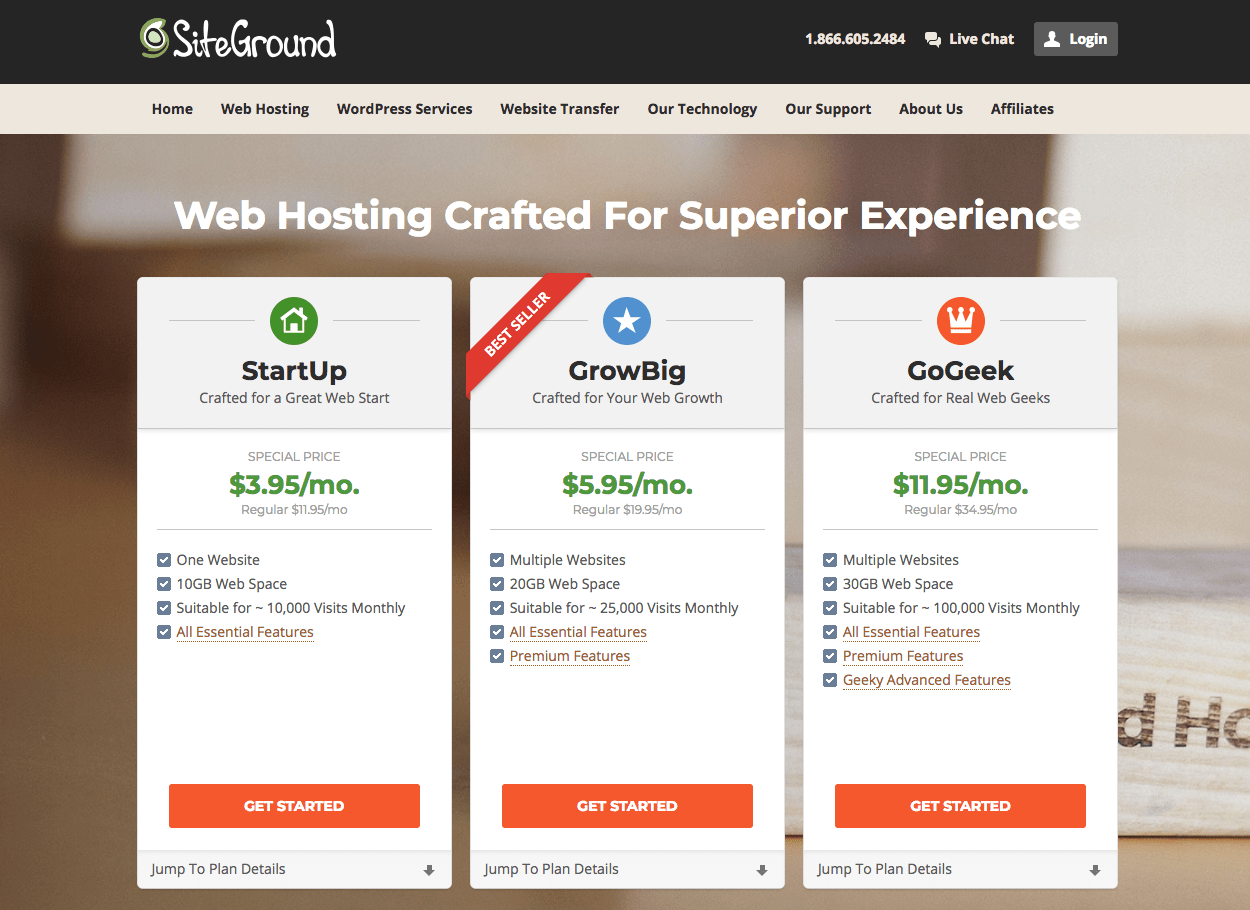
SiteGround has three shared hosting plans (and they are offering a great discount through any links on this page!):
- The StartUp plan is perfect for people who are just starting out. This plan is more than sufficient for a new blog. It can handle up to 10,000 unique visits per month and comes with one click WordPress install (EASY!), free daily backup (although you do have to pay to have your site restored). That free daily back up is important. Most hosts make you pay for that, and you NEED back-up. Regular price USD 11.95 per month, But you can get it for a great discount ($3.95/month) through this link!
- The GrowBig plan is a great value for the money. It offers everything that you can get with the StartUp plan. In addition, you will get free site transfer, up to four times faster loading times, free backup restores, and you can host multiple domains on one account. This plan can handle up to 25,000 visits per month. Regular price: USD 19.95 per month (Or 60% off here.)
- The GoGeek plan is perfect for more established blogs with more traffic, and it’s what I used when I first came to siteground. It can handle up to 100,000 visits per month, has all features of the other two plans plus more. Regular price: USD 34.95 per month (Or just $11.95/month here.)
I was VERY happy with the GoGeek plan, and even though they advertise that it is only good to 100,000 visits, it held strong for me until over 300,000 visits. (At 300,000 I had to switch to a cloud hosting which is $80/month, but siteground had me back up and running in only a matter of hours. EXCELLENT customer service!)
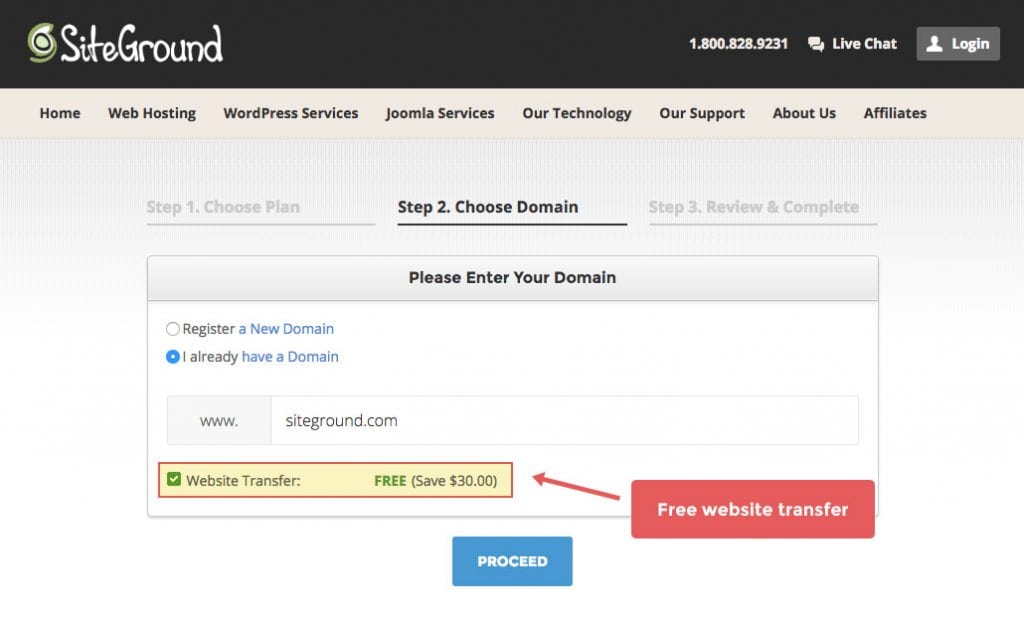
Step 2. Register Your Domain
You can choose to buy a new domain here, or sign up with an existing domain if you have already purchased one. (If you are moving an existing website – the transfer is free with the GrowBig and GoGeek plans! )
Step 3. Review and Complete
Unlike many other hosting providers Siteground’s advertised discount applies to any of the initial periods chosen during the sign up process. This means you are able to purchase hosting for one year at the (advertised) low introductory rate. With other hosts, you have to commit to three years to get the low rate, which means you actually have to put out far more money when you start your blog.
This makes Siteground the best option if you want to try blogging for a year without committing long term – or if you just don’t have three years worth of hosting expense to spend right now.
I strongly recommend that you pay the extra 12$ for domain privacy. That way, you can keep your… privacy. (Otherwise, your information will be entered into the whois data base and will be searchable.)
Step 4. Contact Siteground support via chat and have them walk you through installing WordPress on your new domain.
No, this isn’t cheating. There is no reason you should have to figure out how to do it by yourself. This is exactly how I did it, and having someone hold your hand through the process is one of the many benefits of a paying to be with a great company.
Step 5. Log in to your WordPress dashboard
Go to your website and login. In your internet address bar enter www.yourdomainname.com/admin. This will take you to your login page, (and WordPress is already installed on your website, because you did that with the customer support people).
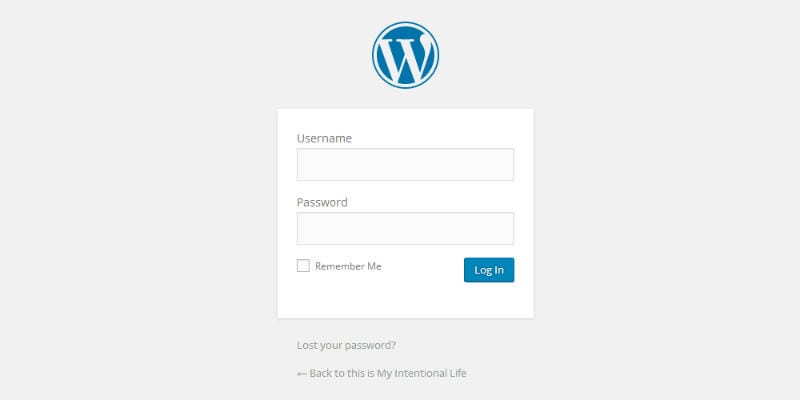
Once logged in you will see your WordPress dashboard.
(You’re gonna get really comfortable here.)
Congratulations – you own a website! Your own little piece of the internet, where you will create something amazing. And, if you do it right, you will inspire readers, connect with new friends and make money while you’re at it.
It’s gonna be awesome.
If you have no idea what to do next, be sure to check out my completely FREE 13 part mini course – How to Start a Blog and MAKE MONEY!
Or just move right on to the next step – and it’s the fun part. Choosing and installing a theme. Your theme is the way your blog looks. It’s the fonts, the colors, the layout. There are THOUSANDS of free and paid for themes to choose from. It’s mind boggling actually!
Oh, and there is a little bit of picky house keeping we can do in WordPress before we do anything else too.
So let’s get started on that… shall we?
On to the next step – Choosing a theme →
Looking for other blogging tips? Check out these posts:
Choosing a Theme You Love
Creating Your First Blog Post in WordPress
5 Very Important Things to do Before You Start Blogging
WordPress Settings, Permalinks & Google Analytics
How to Install WordPress Plugins
7 Ways to Make Your Blog Look Less Like a “Newbie” Blog
Printable Blog Organization Binder
Affiliate Marketing: Can YOU Really Make Money With It
Or have a look at my Favorite Blogging Resources HERE





Thanks for your how to start a blog post. I have felt this inner push to start a blog for a few months now, but I also feel a lot of inner resistance. Your instructional post has helped me believe I can actually do it.
So glad you enjoyed it Terry! Good luck on your blogging journey 🙂
I loveee writing, I actually almost went to college for journalism, but I no longer partake in the social media world. Would this be a problem for me if I am looking to make a profit in blogging?
Hi Amarra 🙂 Probably not what you want to hear, but yes. IT will be very hard to get enough traffic to get your name out there and make a profit without social media. THAT said, you can think about freelance writing or ghost writing for OTHER bloggers, and that would certainly be a great option!
Hi Carly, I am just starting out. I have written my first post however have not posted it yet. I am currently using wordpress for free online, what is the difference between using that and downloading it?
Also i noticed you chose the $399 option, is there a cheaper option or free option for beginners? I have a lot of resistance from my girlfriend and spending that kind of money will get my in trouble. I also have some personal skepticism so that doesn’t help either.
HI Chris – congrats on starting your blog! That’s so exciting! There is a HUGE difference between using wordpress.com and wordpress.org. The free version isn’s really suitable for having a money making blog. It’s very hard to monetize on that platform. I explain a bit more in depth here in the truth about starting a profitable blog.
There is no free option to have a self hosted blog, no, but in that picture that 399 is not selected. That’s just if you can’t figure out how to install it yourself. (Which you can, by following along with my tutorial!) Sorry for the confusion! You can absolutely just use the cheapest option and upgrade when the time comes. I do believe that starting a blog is like investing in a business… you do have to put some money out! But usually it’s about 4 dollars per month 🙂
Thank you Carly, I have been wanting to start a blog for awhile but most people want you to pay for their course or ebook. I lost my job over 7 years ago and people look at me and see gray hair. I am older but not over the hill. I really want to do this just need to do as you and jump in with both feet.
Hi Kimberly – I’m excited for you!You can absolutely blog with ANY colour of hair! I DO recommend buying one of those books or courses eventually though, because blogging can be an uphill battle without a solid foundation.
Maybe I’m super stupid but I still don’t know how it is you make money… after all of that (super useful explanations) I still don’t get how is it that you get paid. Im serious about trying to start a blog and I really wanna know how it works (the money making part) HELP! THANKS.
HI Jade – I’m SURE you’re not stupid. I didn’t know how you got paid to begin with either! You get paid by the ad networks that run ads on your blog, or if you are an affiliate for any products then you get paid a portion of the sale of the product. It takes time to make money blogging, because you need a solid amount of people stopping by your blog to view your ads or purchase products that you talk about.
Thank you for your helpful info! I am finding myself returning to it often! One thing I am still unsure about is: It seems if I start with my wordpress.com account then I will get the domain name for free and will not have to pay for it when I sign up with siteground.com. Is this accurate? I really to feel like a fish out of water, but I can learn. Thanks for any help you can give!
Hi Jennifer! No — you have to pay for the domain name or else it won’t truly be just yourURL.com… the free ones will be something like yourURL.wordpress.com, and you don’t want that. siteground will help you get all set up with the domain name! (Or you can buy it anywhere and then transfer it to siteground, but that’s just more hassle!) Let me know if you have any other questions 🙂 Good luck on your blogging journey!
Your overall blog and this specific info about starting a blog is fantastic! Thanks for sharing with us. It’s time for me to upgrade my laptop and I have skills with both Mac and PC. My question – is Mac or PC preferred for creating and publishing content? Do you know what is most used by bloggers, what do you use, and does it really matter? (Do Siteground and WordPress function equally well on both platforms?) Thanks again!
O boy Donna I have NO Idea to be honest! I bet they do function equally well tho, or that is something I am SURE we would hear about in blogland.
This series is beyond helpful. I came here literally everyday during the prep for my first blog, which I launched on Monday! I am still working on perfecting it, but you have helped so much!
I’m sooooooooo glad to hear that <3
Hi Carly! Thank you for all of the information in your posts! I am starting a blog thanks to your info. I have a question for you – Can you create a logo using Divi? Thanks! Erin
not really – you’ll still need to create in an editor and upload it!
I have a domain name that I purchased through go daddy… now I have no idea what to do! Is go daddy also a host, Like you mentioned like siteground is? Confused on how to go about starting a blog. And how everything connects. Thank you!
if you have a domain purchased through go daddy (or anywhere else) you can still start your blog on siteground. It is actually good practice to have your domain name and your blog hosting on different companies 🙂 That way you are not “all in” with one company!
I just wanted to say I love your blog & always look forward to your e-mails. You’ve really inspired me to take that leap & give the blogging world a shot. I’ve been considering it for almost a year now but have been too chicken. So thank you!
P.S. – Congrats on the new bundle of joy! I hope you & your family are enjoying mommy’s time off. =)
Thank you!!! <3 I wish you ALL THE BEST with your blog Deanna!